
Premium Report - Product Cleanup
Product Cleanup
This report is for merchants who are looking to update and cleanup their products in Shopify.
Using this report, you can see exactly which products are missing which values, navigate directly to them in Shopify (click the hyperlink for each Product Title) and then update them accordingly.
You can find this report under Products in the left-hand menu.
As a Premium Report, this is available on all Paid Plans of Report Toaster. If you aren't signed up, follow these steps here to upgrade your account.
(click image to enlarge)
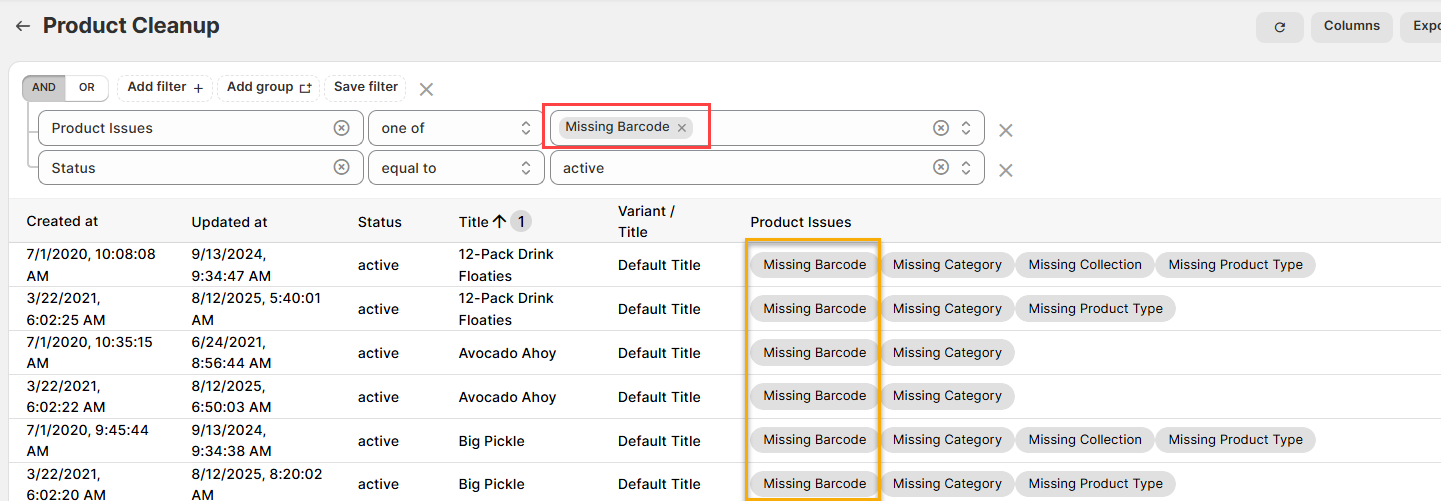
Note - The Product Issues column will still display every issue the variant has regardless of what you select in the filter.
The purpose of the filter is to ensure that only products that have that issue display in the report.
E.g. if Missing Barcode was all that was selected, then only Variants missing a barcode would display in the results - 31/47 total.
(click image to enlarge)
Here is what you need to be familiar with to understand the Product Cleanup report.
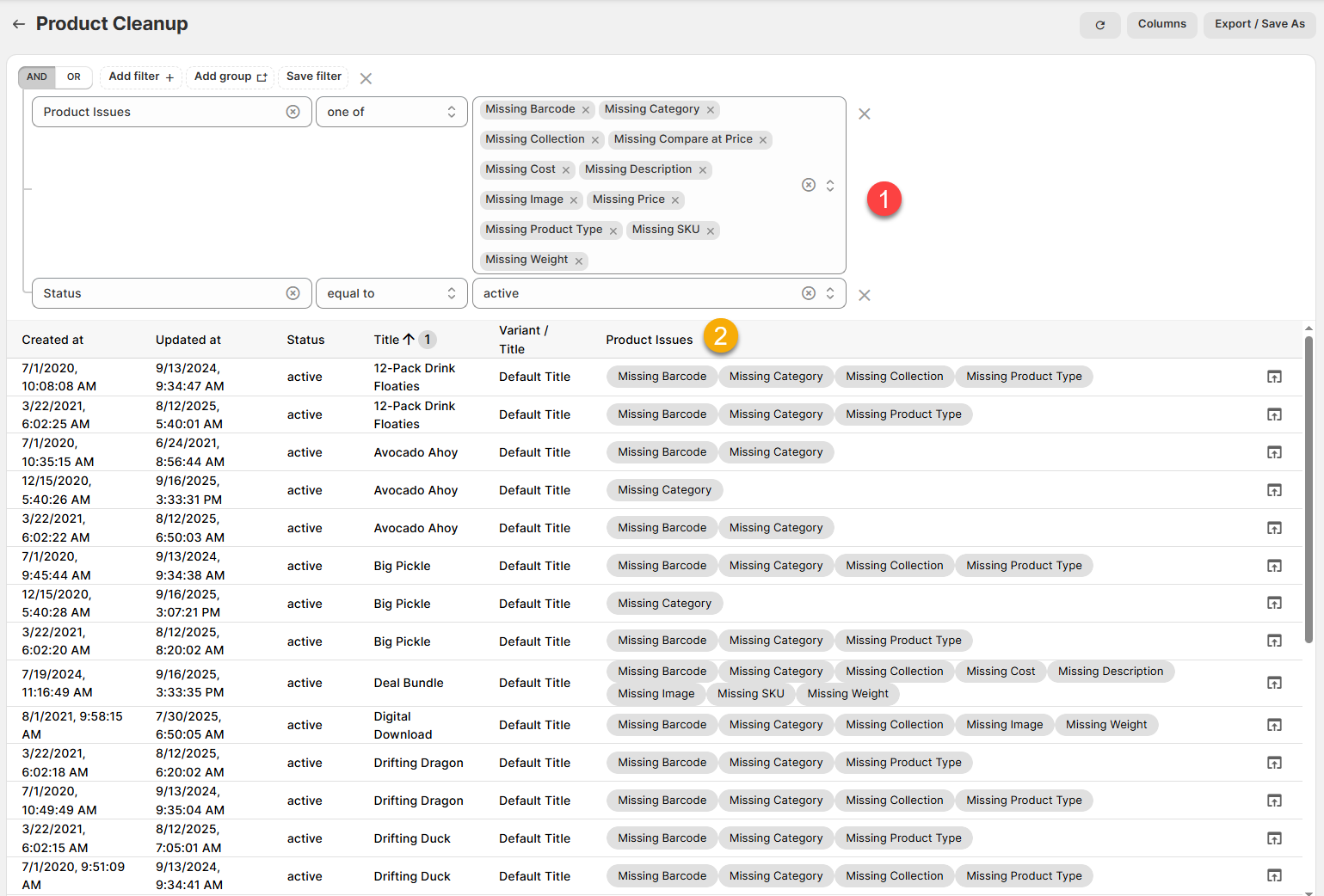
1.) Product Issues, one of _____, Status, equal to, active (FILTER): These filters ensure that only products with the associated issue (see below) that are currently active appear in the list.
By default, this filter includes all of them, but feel free to remove the ones you don't care about.
For example, looking at the first screenshot, we can see there are 47 products that are missing some fields.
Some are only missing Barcode or Category, but the Digital Download is also missing a Collection, Image and Weight
2.) Product Issues. Which fields are missing for this Product Variant. Possible values include:
Missing Barcode - Whether this is a Barcode, UPC or ISBN, these are often crucial to track and organize your inventory.
Missing Category - This is an issue if you make use of the Product Category from Shopify's Standard Product Taxonomy.
Missing Collection - This is an issue if you rely on Collections to group your products and monitor how well each of them are selling.
Missing Compare at Price - This is an issue because you won't be able to accurately measure Markdown vs Full Price sales and see which of your Variants are most discounted.
Missing Cost - This is an issue because you won't be able to accurately measure Profit and this can directly hurt your bottom line.
Missing Description - Most customers want at least a short description to provide details of what they're buying!
Missing Image - This is an issue because most customers want to see a photo/video of the product before making a purchase.
Missing Price - This is an issue because, aside from free samples, most products you sell will need a price.
Missing Product Type - Typically this is useful to organize your products into unique categories, so if the values are blank, those items won't be included in Sales by Product Type report.
Missing SKU - Again, the Stock Keeping Unit (SKU) is usually used in tracking and organizing inventory. You may also want to check out our Duplicate SKUs report as well.
Missing Weight - Doesn't matter for digital goods, but often vitally important for physical goods in the warehouse and especially for Shipping.
For example, many of these variants in our demo store are missing a Barcode and a Product Type. This might make it difficult to manage inventory and assess sales on a grouped category basis.
Finally - If you want to see more details on any of the variants, then you can click the pop-up box on the right side of each row to see all of the relevant details. (including the current values for the above).
Like all Report Toaster reports, these reports are fully customizable - so you can add/remove columns, introduce a filter or change the sort to suit your individual needs. See our basic guides here for more info.
For other premium reports you can add to your account, check out our other article guides here.